

Invoices and payments with clear payment status
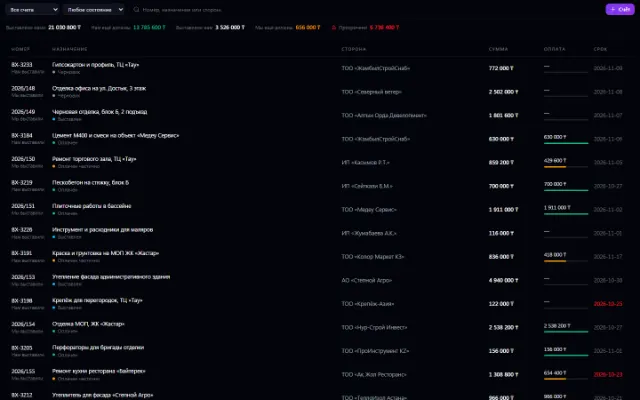
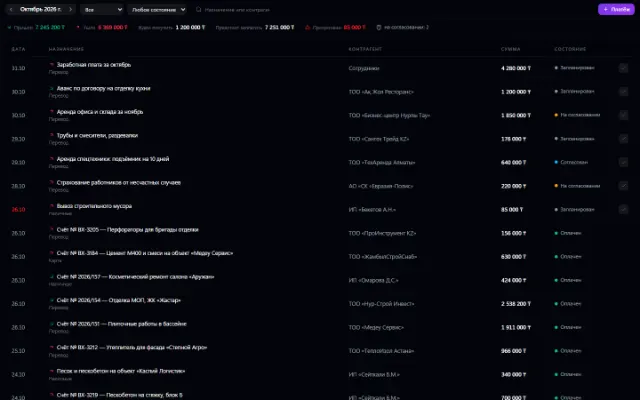
For everyday financial control, you need to see what a payment is for and the balance left on an invoice. In Business OS, the Invoices and Payments apps work with linked records: one invoice can be paid in parts, and posted payments determine its status.
For managers and people responsible for payments who need a working register of invoices and payments.
Each app in detail
What you can do
Incoming and outgoing invoices
Keep numbers, counterparties, issue dates and due dates. Add line items with quantity, price and amount.
Partial and full payment
Link payments to an invoice and see its status. Payments marked as paid are counted.
Planning and approval
Record the purpose, method and date of a payment, and change its status along the workflow. With approvals connected, route the transaction to the people responsible.
Link with procurement
An invoice can be created from an approved purchase request. The history helps you understand where a record came from and what was done with it.
Example: pay for a delivery in two parts
- 1
Create the basis
Create an incoming invoice or get it from an approved purchase. Check the line items and due date.
- 2
Record the first payment
Create a linked payment and mark it as paid after the actual transfer.
- 3
Settle the balance
Enter the second payment and check the invoice status and transaction history.
Requirements and compatibility
Recording a payment in the system does not make a bank transfer. The apps are meant for operational records; bank integrations and statutory accounting and tax reporting need separate discussion.
Questions and answers
If your scenario is different, tell the CODE44 team about it.
Discuss your needsCan one invoice be paid with several payments?
Yes. Link separate payments to one invoice; the payment status is determined by the posted amounts.
Who can create linked records?
An employee needs access to the relevant apps. Access to an invoice doesn't replace permission to work with payments.
Is the system suitable for tracking deadlines?
An invoice has a due date, and a payment has a date and status. Use these fields for ongoing control of obligations.
A workspace built around your tasks
We want every company to work comfortably. The CODE44 team can build additional features for you free of charge: we will discuss the task, scope and implementation order.
Business OS is updated continuously with the support of a team of more than 40 people. Delivered features and plans are collected in the development plan.