

Procurement from request to delivery
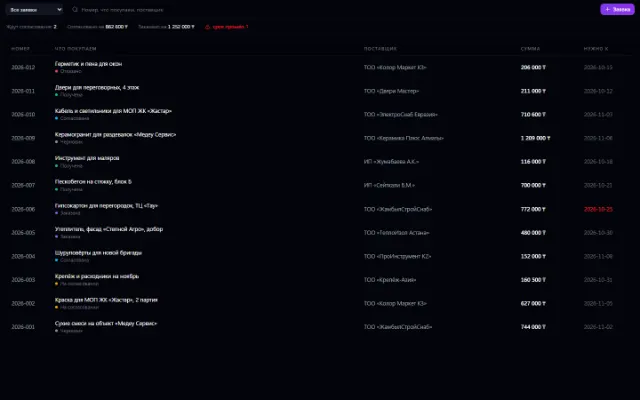
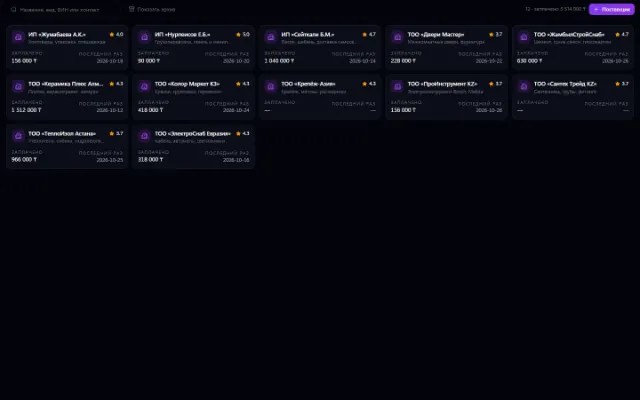
A purchase request often starts as a message and ends up as several unrelated files. Business OS lets you manage suppliers and requests in dedicated apps, keeping line items, amounts and stages of work. From an approved request, you can create a linked incoming invoice.
For office purchasing, supply teams and anyone who needs a purchase approved before ordering.
Each app in detail
What you can do
Supplier profiles
Keep company details, contacts, bank details and price lists. Return to the history of purchases and invoices for each supplier.
Requests with line items
Add the goods or services you need, quantity and price. Use the supplier's data to prepare the request.
Sequential stages
Move the request through approval, ordering and receipt. Participants see the purchase status and its history.
The basis for payment
Create an invoice from an approved request: line items and amounts carry over to the linked record. The payment itself is then made in the Payments app.
Example: buy equipment for a department
- 1
Choose a supplier
Check their card and prices, and gather the line items into a request.
- 2
Approve and order
Send the request for approval, then mark the order and receipt as they actually happen.
- 3
Pass it on for payment
Create an incoming invoice based on the approved request and continue with payment in the finance apps.
Requirements and compatibility
Creating a linked invoice requires the Invoices app to be connected and the appropriate permissions. A receipt status in the request doesn't mean full warehouse or accounting records are kept automatically.
Questions and answers
If your scenario is different, tell the CODE44 team about it.
Discuss your needsDo I need to re-enter line items for the invoice?
When you create an invoice from an approved request, line items and amounts carry over to it. Check the details and dates before using it.
Can I keep several suppliers?
Yes. Each supplier has its own card, contacts and price list; choose the right one when working on a purchase.
Can I rate suppliers?
The app provides ratings for meeting deadlines, quality and communication. They help keep a record of your experience working together.
A workspace built around your tasks
We want every company to work comfortably. The CODE44 team can build additional features for you free of charge: we will discuss the task, scope and implementation order.
Business OS is updated continuously with the support of a team of more than 40 people. Delivered features and plans are collected in the development plan.